Monday, October 23, 2023

Not Ready For Prime Time? Luminar Neo GenErase; You Be The Judge

"GenErase: next-generation Erase tool that not only removes unwanted distractions from your images, but also intelligently replaces those areas using content-aware AI tools, providing a focused and distraction-free composition. This feature preserves the integrity of your photos by filling in the gaps with textures and other elements using AI to match the surrounding area. GenErase can seamlessly remove objects such as trash, street signs, utility poles, vehicles, graffiti, crowds, and more to preserve the beauty of the composition."

The above description is from the October 20 press release from Skylum Software, makers of Luminar Neo, and describes how the new GenErase generative AI tool performs.

I've been fortunate enough to have access to a beta version of the tool, and some images from Skylum to play with, as well as some of my own images from a local air show this past weekend. (People just can't stop walking into my pictures! A perfect test).

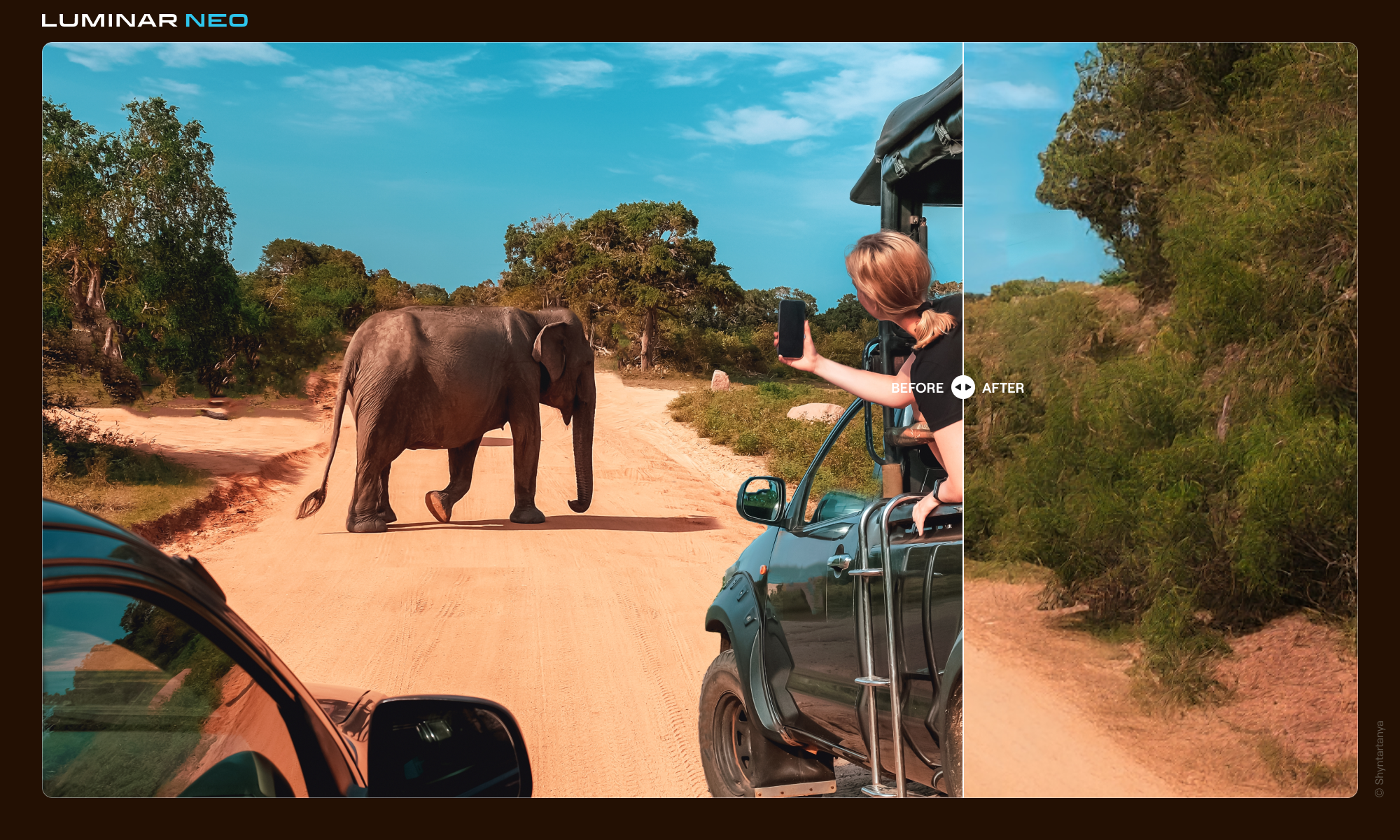
The image above was supplied by Skylum. The boat in the foreground is obviously a distraction. The next image shows the tool UI. Fairly simple, you have a "Select", "De-select", and "Erase" tool which is pretty self explanatory. Select the items you want to remove, De-select if you get a little sloppy, and Erase when you're ready to send your image to the Cloud where all the heavy lifting is done. Depending on your internet (required!) speed and strength, the resulting image will show up in the Generative Creations folder (created when you first use the tool) in a few seconds, or a few minutes. Mine were running about 2 minutes because my internet sucks😏 Below is the resulting "GenErased" image. (On a subsequent use, I got rid of all the little buoys in the background). Looks very good. Click to enlarge, and you won't see the telltale repeating elements you sometimes get with clone and stamp, or the basic Luminar Neo erase tool. Because it's a simple task in this case. Challenge it, and it seems to struggle a bit. (But I do remind myself, this is a beta copy, and the Skylum folks do a pretty good job of  fixing all the bugs when the official releases roll around.)  Below, I'll show you one of my air show results, and will then close with some comedy. Or, Halloween horror. I haven't decided yet.


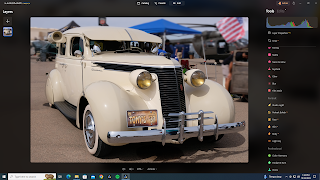
Okay. I said it was an air show, and it was, but you know I can never resist a car shot. PhotoBro Dale had to lean in a little too close to this gorgeous 1937 Studebaker. Guy walking up in the background annoyed me as well. They had to go. 
I
If you look at the background-left of the resulting image (middle), you can see some weirdly warped artifacts created by the AI. Not too awful, because 1) I was going to use the blur tool on the background, and 2) I was going to crop it. (bottom)

I also just realized that tiny rectangle on the rear fender is not part of the car, as I originally thought, but it probably an artifact from that background dude's shoe. No problem, it can be removed easily with the standard erase tool.

Now, read on for a hilariously scary result...

So, back story: A couple of months ago a long time friend of mine  messaged me and asked what was wrong with Luminar Neo erase tool. He'd been given a picture by a family friend of herself, a deputy, and a third person who was not identified. The deputy (personal bodyguard) was between the two women. She wanted the bodyguard removed from the picture. He'd been trying to use the erase tool. I told him this might be best fixed with a new generative AI tool coming in the Fall, or clone and stamp. He sent me the picture, (with the third person- a celebrity- cropped out. You can just see the edge of her jacket, extreme left corner.) I got the process started with clone and stamp with some success. I think he finished it and was generally satisfied. (I have obscured the faces to protect the identities... handy tool that Blur tool!)


Fast forward to last week when I downloaded the beta version of GenErase, and thought, let's see if I was right. Could I remove the cop? I was very meticulous with the Select brush, carefully avoiding any part of the other subjects in the image, said "here goes", and pressed Erase, thinking how I would crow to my friend how awesome GenErase was going to be.

First my jaw dropped as I stared dumbfounded at the resulting image. I could make no sense out of the content the AI created from presumably whole cloth.

Then I started to laugh, because it was so ludicrous. Finally, my laughter became hysterical as I became ready to swear allegiance to our AI robot overlords, because if it can summon denizens from the Multiverse of Madness to populate our photos, then there is no hope for us and we are doomed!

Just look:


Whaaaaat? Let's just say, I was expecting a completely different result and leave it at that.

Anyway, GenErase is scheduled to go launch on October 26th. It will be available to all subscribers and Creative Journey Pass owners. If you are neither of those, and you want access to all the goodies and tools included in the current version of Luminar Neo, and those to come for the next 12 months just follow this link, and between 7AM (EST)October 28 and  7AM (EST) November 2, save 31% off any purchase at Skylum with the code: NEO31OFF

Trust me when I say, GenErase  will improve with use, because that's how AI works, and all the currently existing tools are well worth the time you'll save, and the images you'll create versus many of the other players out there. Give it a try, RISK FREE!

Posts may contain affiliate links. If you make a purchase through one of these, I may receive a small commission at no increased cost to you. Thanks.

Wednesday, September 27, 2023

Update Extra! Train Time!

Update to Luminar Neo v. 1.14.0 arrived yesterday, so if you're on one of the subscription options you'll have the new Neon & Glow tool, as well as the addition of Tilt/Shift to the Blur tool as soon as you install the update.

Big Boy On Acid (Neon & Glow) ©Daniel Gauss/Shot On Site


Durango & Silverton RR (tilt/shift blur) ©Daniel Gauss/Shot On Site

If you're an existing Lifetime owner, you'll need to purchase the Creative Journey Pass to have access to these updates, and all the extensions and tools to come from now until next Summer! Your other option, of course, is to upgrade to one of several subscription models here.  Remember, there's a bunch of really cool stuff coming, as I wrote about in the previous post.

Don't forget, you can save 10% off whatever you purchase with the discount code: PHOTODAN


Posts may contain affiliate links. If you make a purchase through one of these, I may receive a small commission at no increased cost to you. Thanks.

Thursday, September 21, 2023

Coming Attractions!

Sherri M. ©Daniel Gauss/Shot On Site
The fine folks at Skylum Software, the makers of Luminar Neo are poised to virtually bust a nut with new features this Autumn. The first of these is the already released Studio Light tool, which I've already featured here a couple of weeks back.  I've spent some more time with it, and have refined my technique a little, getting familiar with some of the options. Here's an example from a model shoot we had at the local photo club several years ago, and displays the use of some of the light patterns available. This isn't a tool I anticipate using a lot until it's (hopefully) available for more than human portraits.

Now suppose I was an accomplished graphic artist (I'm not) and I wanted to add some punch to use this already well polished image in, say, some magazine ad copy?(Dream on, Dan).  That's where the Skylum pipeline is ready to shoot out the next new tool. It's called Neon & Glow, and I'm fortunate enough to have been supplied an advance beta copy, to play around with, evaluate, and publicize here. And since there's no embargo on info for this particular tool, I can show you right now.

I must admit, I struggled a bit getting familiar with the sliders and buttons, and how to structure a work flow. I watched a few YouTube videos by some of the Luminar brand ambassadors, and that helped. The first effort started out slowly, while I just threw commands and adjustments and different neon and glow colors at it. I also added several other layers from other tools, and frankly made a mess of it until suddenly it looked like a finished product. Happy accident, but that's the fun of Luminar Neo:

"Flashing Ann Arbor" ©Daniel Gauss/Shot On Site

Funny anecdote here.. these kinds of edits are not everyone's cup of tea, as my friend Bob will attest. I sent this to him, and his reply verbatim: "Cool, art but not photography.  You did that in the computer not in the camera in the field."  Of course, feeling quite contrary, I countered with: "It all begins as photography.  45 years ago, in this case."  What I meant, of course, is that it always begins with a photograph, and this particular photograph is about 45 years old. But I stand by the larger point here, as well.

Anyway, that's neither here nor there. You want to see what I did to bring some pop-sizzle-bang to that photo club shot. Well here you go. This includes Neon and Glow, and one of the native Luminar Neo layers in the Flares collection. Oh yeah, see the sparkles? They're part of the Glow tool.  I like it, and I hope Sherri M. likes it, too (if she sees it!).

Neon Sherri M. ©Daniel Gauss/Shot On Site

So, you've read all the way down here, waiting for the really big Fall news, right? Here you go. Over the next few months, Skylum will by launching several Generative AI tools, which you can get a brief summary of in this press release from August! 

Time to throw some bullet points, samples, and short summaries (lifted from the press release in case, you know, you're too lazy to click the link above).
  • GenErase: A next-generation Erase tool that not only removes unwanted distractions from your images butalso replaces those areas using content-aware tools, providing a focused and distraction-free composition.This feature preserves the integrity of your photos by intelligently filling in the gaps with textures and otherelements to match the surrounding area. GenErase can seamlessly remove objects like trash, street signs,vehicles, graffiti, and more to preserve the beauty of the composition.
  • SceneExpand: This tool enables users to extend the boundaries of their photos, adding a new dimension tooriginal compositions. Whether creating panoramic landscapes or adding breathing room to favorite images,SceneExpand offers the ability to break free from traditional aspect ratios and unlock new creative possibilities
  • SceneSwap: Lets users replace specific elements (such as the sky or foreground) with high-quality AI-generated visuals that blend seamlessly with the rest of the photo. Imagine a stunning sunset replacing thedull, overcast sky or crystal-clear azure waters instead of a murky pond in your photo
  • Water Enhancer: Designed to enhance water features in aquatic scenes, giving landscape photos greatervisual impact
The first three items are the biggies, and the ones causing some consternation, because unlike all previous tools and extensions available, GenErase, SceneExpand, and SceneSwap will require the user to have an active internet connection. Unless you own, oh I don't know, and IBM Watson supercomputer, you'll need a whole lot more computing power than you've probably got. Skylum will use a massive server farm to help you do these edits in a timely fashion. When you see the examples below, you may see why I think this is a reasonable requirement.  So here they are.


SceneExpand
GenErase


SceneSwap
Water Enhancer


Exciting stuff. And if you're lucky enough to be on the Luminar Neo Subscription model, you need do nothing. These will be included in regular updates.  If you own a copy of Luminar Neo, you'll have options to buy these tools either in your account at the Luminar Neo website, or through clicking on the puzzle icon on the upper right of the app.  Or there's another option: you can purchase the Creative Journey Pass for $79 and you'll get all the new goodies, and any still unannounced extensions or tool through August of 2024. Hell of a deal!  And, as always, use PHOTODAN at checkout to save 10%!


Posts may contain affiliate links. If you make a purchase through one of these, I may receive a small commission at no increased cost to you. Thanks.